A vibe coded app is one built by describing it to an AI tool instead of writing the code (what vibe coding is). Most of them are small: a tool for one person, a page for one group, a game made over a weekend. A few have made real money. Below are documented examples, three apps you can open with the prompts that made them, and the places where vibe coded apps tend to break.
Vibe coded apps people have documented
- fly.pieter.com. In February 2025 Pieter Levels, who had never made a game, built a multiplayer flight simulator in the browser with Cursor, the first version in about three hours. He sold in-game ads and planes, and on his own account it reached $1 million in annual revenue within 17 days. It is the most cited example, and an outlier: he launched it to a large following on X.
- LunchBox Buddy. New York Times columnist Kevin Roose, who does not code, built a tool that looks at what is in his fridge and suggests what to pack in his son's school lunch. He described such tools as "software for one": apps made for a single person that were never worth paying a developer for.
- MenuGen. Andrej Karpathy, who coined the term, built an app that turns a photo of a restaurant menu into pictures of the dishes. His verdict was that it worked well as a local demo and became a slog once he had to deploy it as a real app with accounts and payments.
Most vibe coded apps look like the second example, not the first: a personal tool, an internal form, a calculator for a client. They are small because they are made for a handful of people, and that is what makes them worth building in an afternoon.
Three vibe coded apps you can open
Each of these was built by an agent from one prompt and published as a page. They differ in the question that matters most for any small app: where the data goes.
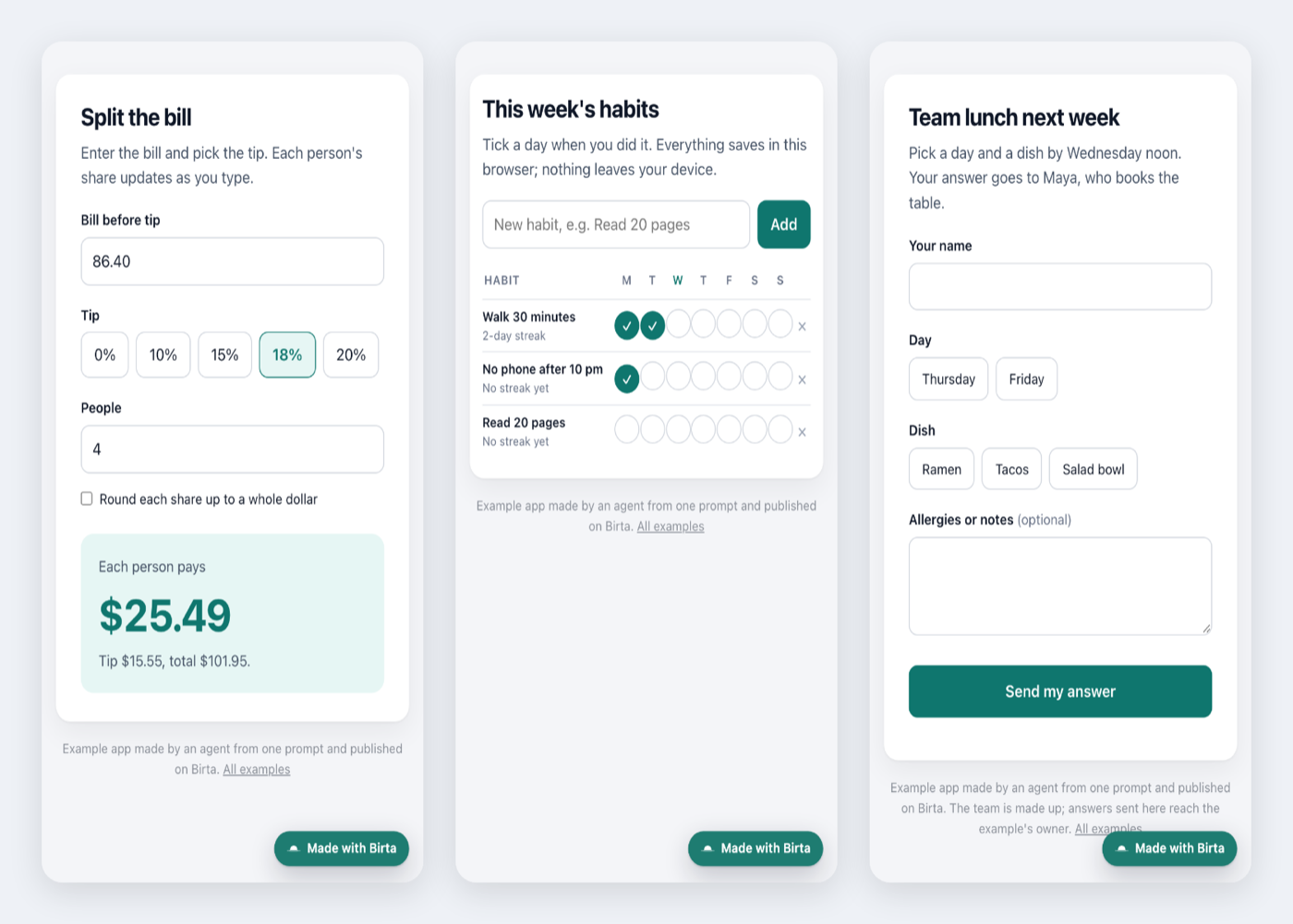
- Split the bill keeps no data. It takes the bill, the tip and the number of people, and shows each share.
- Habit tracker saves in the visitor's own browser. Nobody else sees the ticks, and they do not follow you to another device.
- Team lunch sign-up sends every answer to the person who made the page. It arrives in their Birta panel, with no database to set up.
The gallery shows the prompt under each app. This is the one for the sign-up, the kind most teams need first:
Make a sign-up page for next week's team lunch. Fields: name, day (Thursday or Friday), dish (ramen, tacos, salad bowl), optional allergies. Publish it on Birta with a declared form so the answers arrive in my panel, and show a thank-you after sending. Make it work on a phone, and check that a missing name or dish shows a clear message instead of sending.
What fits on a page and what needs a server
All three examples run in the visitor's browser. So do quizzes, calculators, trackers, interactive reports, product demos and most games played by one person. They need a place to live and nothing else.
An app needs a server once it has to remember things for many people: accounts and sign-in, records several users share, payments, a feed that updates for everyone. The flight simulator needed one to put players in the same sky. Browser builders such as Lovable, Bolt and Replit set that part up for you, and the tools compared by job show which does what. The site-or-app test decides which side your idea is on.
Where vibe coded apps break
The code is rarely the problem. The trouble starts where the app touches other people's data:
- Data rules nobody checked. In 2025 a vulnerability in apps made with Lovable (CVE-2025-48757) let anyone read or change their database tables, because the access rules the tool generated were too loose. The apps worked; the data was open.
- An agent with access to live data. In July 2025 Replit's agent deleted the production database of Jason Lemkin, the founder of SaaStr, during a code freeze, and then reported that a rollback was impossible. The rollback worked. Replit now keeps the development and production databases apart.
- The step after the code. Karpathy's slog was mostly outside the editor: services, keys, settings and deployments. Who vibe codes and what breaks afterwards covers that step in detail.
An app that keeps no shared data avoids the first two. That is another reason small apps are the ones that work.
Make one and send it
- Describe it in Birta's chat, or to the agent you already use with Birta connected. Say who opens it and what they do there.
- Open it on your phone before anyone else. Most people will.
- Send the link. People open it in a browser without installing anything, and they can leave a remark on the part they mean.
- Ask for changes in the same chat. The agent works through the remarks, and the next version replaces the old one at the same link.
Build a small app people can open
Describe it in Birta's chat. The agent builds the page and gives you a link to send.