
What a business proposal includes
A business proposal answers four questions for the person who pays: what problem you solve for them, what exactly they get, by when, and for how much. Everything else supports those four. The order that works: a one-sentence outcome, the client's problem in their own numbers, measurable goals, the scope with what is not included, a dated timeline, the price, a short proof that you have done it before, and one next step.
Here is that structure filled in for a made-up web studio and a bakery, as a live page:
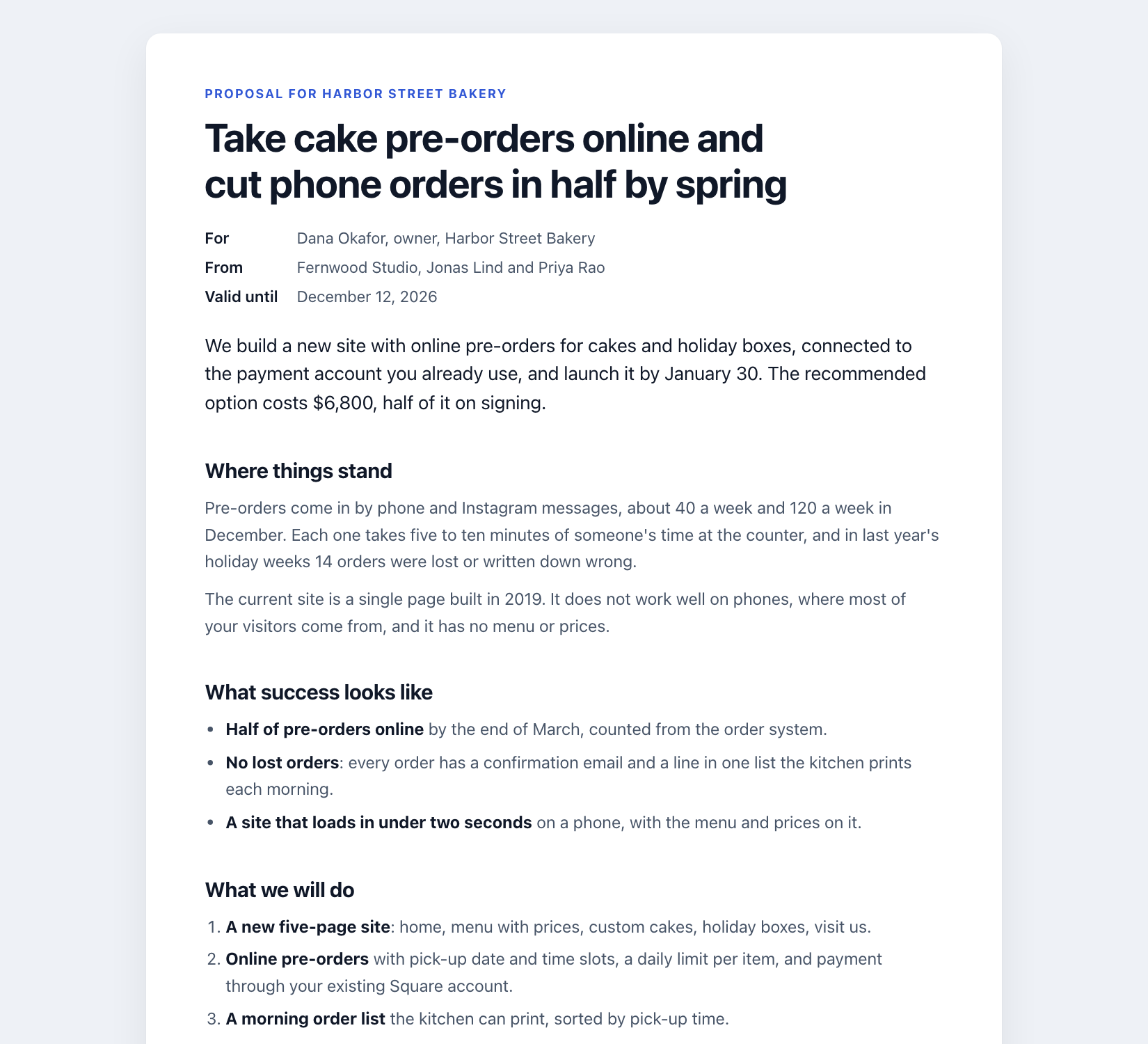
Open the full proposal, then copy the template below.
The business proposal template
[HEADLINE] The outcome the client gets, in one sentence.

For: [client name, role, company]
From: [your name, company]
Valid until: [date]

[SUMMARY] Two sentences: what you will do, by when, and the recommended price.

WHERE THINGS STAND
[The client's problem, with their numbers: volume, time lost, money lost.]

WHAT SUCCESS LOOKS LIKE
- [Goal with a number and a date]
- [Goal with a number and a date]

WHAT WE WILL DO
1. [Deliverable]
2. [Deliverable]
Not included: [what the client might assume is in the price]

TIMELINE
- [Weeks or dates]: [phase and what the client sees at the end of it]

INVESTMENT
Option A, [name]: [price] | [what it includes]
Option B, [name], recommended: [price] | [what it includes]
Payment terms: [split and when]

WHY US
[One past result close to this project, with a number.]

NEXT STEP
[One action for the client, and what you do within a day of it.]
It is plain text, so it pastes into Word, Google Docs or an email and keeps its order. It also works as an instruction for an agent: the prompt further down uses it. The Word version has the timeline and the price options as tables, and opens in Google Docs too:
How to fill in each part
- Headline. The result for the client, not the name of your service: "Take cake pre-orders online and cut phone orders in half by spring", not "Website proposal".
- The problem. Use the numbers from the call: 40 orders a week by phone, 14 lost last December. A client who reads their own numbers knows you listened.
- Goals. Each one checkable later, with a number and a date. "Better online presence" cannot be checked; "half of pre-orders online by March" can.
- Scope and exclusions. List deliverables a client can point at. Then write what is not included: it is the line that heads off disputes after signing.
- Timeline. Dates or weeks, and what the client sees at the end of each phase. Say when you need something from them, such as content or approvals.
- Price. Two options make the decision "which one", not "yes or no". Mark the one you recommend, and put running costs the client pays elsewhere in the open.
- Proof. One result from a similar project beats a page about your company.
- Next step. One action and a deadline for the offer. Several options for what to do next usually end in no reply.
Write the summary last, when the price and dates are fixed. For a long proposal that needs a full page of summary up front, see the proposal executive summary example.
Solicited, unsolicited, or a follow-up
The parts stay; the opening changes.
- Solicited. The client asked for proposals, often with a request for proposal (RFP). Follow their order and their headings, even where the template differs: whoever compares five proposals looks for the same section in the same place.
- Unsolicited. Nobody asked, so the problem section carries the proposal. Keep it to one page and end with a short call, not a contract.
- After a discovery call. The most common case, and the one the template is built for: the client expects it, and every number in it comes from the call.
Draft it from your call notes
An agent turns rough notes or a call transcript into a first draft in a minute, if you tell it the structure and forbid it to make up numbers. Paste your notes into Birta's chat, or into the agent you already use with Birta connected:
Write a business proposal from my notes below and publish it on Birta as a single page. Structure: a headline that states the outcome for the client; for, from, valid until; a two-sentence summary with the recommended price; the client's problem with their numbers; three goals, each with a number and a date; what we will do as a numbered list, then "Not included"; a timeline by weeks; two priced options with the recommended one marked, and payment terms; one past result as proof; one next step. Use only the numbers, prices and dates in my notes. Where one is missing, leave a visible placeholder like [price] and list the gaps at the end of your answer. My notes: [paste call notes or a transcript, your prices and your availability]
Check the price and the exclusions yourself before you send it. Those are the two parts a client holds you to.
Send it as a page, not an attachment
A PDF gets forwarded, printed and replaced by a newer PDF nobody can tell apart. A proposal at a link works differently:
- It opens on a phone, which is where a busy owner reads it between other things.
- The client comments on the line they mean. "Can we drop the time slots?" lands on the scope item, without an account, instead of in a long email thread.
- The next version goes to the same link. You change the price after the call, and the address the client already has shows the new one.
- You see whether it was opened. A Birta project shows approximate visitors by day: a number, not a name. What that can and cannot tell you is explained here.
Each section and option on the example page has its own anchor, so a follow-up can point
at one line: business-proposal-example.birta.link/#option-b.
Turn call notes into a proposal
Paste your notes into Birta's chat. The agent writes the proposal and gives you a link the client can comment on.