What goes in meeting notes
Good meeting notes answer three questions for someone who was not there: what was decided, who does what by when, and what is still open. Put those first. A one-line summary goes above them and a short record of the discussion goes below, for anyone who needs the reasons. Who said what, minute by minute, belongs in the recording, not in the notes.
Here is that format filled in from a made-up product meeting, as a live page:
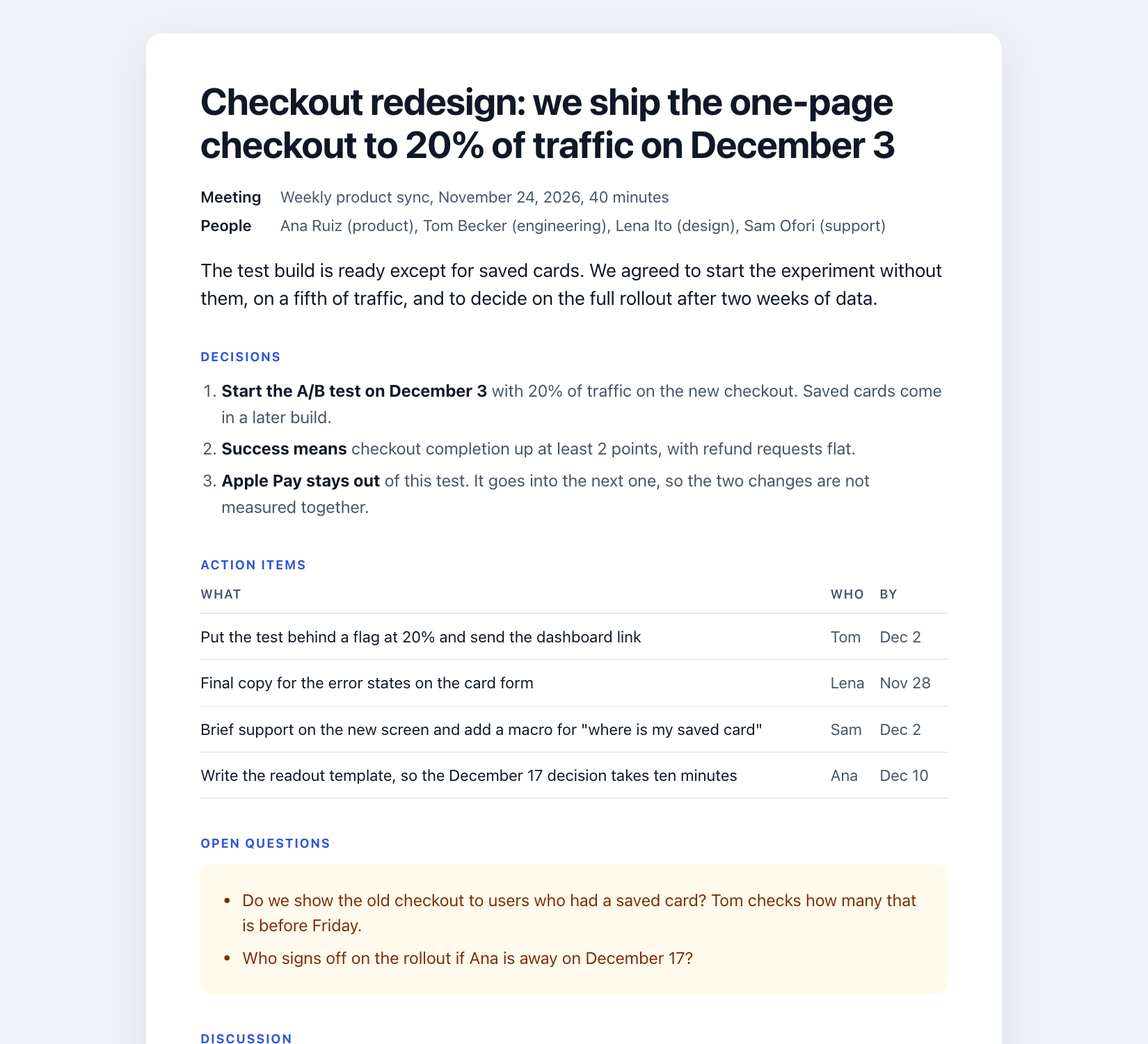
Open the finished notes, then copy the template below.
The meeting notes template
[HEADLINE] The main outcome of the meeting, in one sentence.

Meeting: [name], [date], [length]
People: [names and roles]

[SUMMARY] Two sentences: where things stood and what changed.

DECISIONS
1. [What was decided, stated so it can be acted on]
2. [...]

ACTION ITEMS
- [Task] | [one owner] | [date]
- [Task] | [one owner] | [date]

OPEN QUESTIONS
- [Question] | [who finds the answer, by when]

DISCUSSION
- [Topic]: [the options raised and why the group chose what it chose]

NEXT MEETING: [date], first item: [...]
It is plain text, so it pastes into Word, Google Docs, Notion, OneNote or an email without fixing a layout. It also works as an instruction for an agent: the prompt further down uses it. The Word version has the parts as headings and the action items as a table, and opens in Google Docs too:
How to fill in each part
- Headline. Write it last, as the outcome: "We ship to 20% of traffic on December 3", not "Checkout sync". Someone reading only the subject line of the email should know what happened.
- Decisions. One line each, with the number or date that makes it final. "Start the test on December 3 at 20%" can be acted on; "discussed the rollout" cannot.
- Action items. One owner per task, never "team" or "we", and a date. A task with two owners has none.
- Open questions. Give each one a person who brings the answer. Otherwise it comes back as an open question next week.
- Discussion. Record the options that lost and why. That is what people forget first, and what saves the next meeting from having the same argument.
Send the notes the same day. The longer they wait, the more people act on their own memory of the call.
Three versions of the template
The parts stay; their weight changes with the meeting.
- Team sync. Action items carry the weight. Keep the discussion to a few lines and start the next meeting with the open items from this one. For people outside the team, the week's outcome goes into a project status report.
- Client call. Add a line for what the client asked for, in their words, and for what you promised. Send the notes to the client too: they become the record of the agreement.
- Formal minutes for a board or a committee. Add attendance and quorum, each motion with who proposed it and how the vote went, and an approval line for the next meeting. Minutes record the decisions and the votes; discussion stays short or out.
Fill it in from a transcript
Most calls are recorded now, and Zoom, Google Meet and Teams can export a transcript. A transcript is not notes: an hour of it runs to thousands of words, decisions are buried in the middle of sentences, and nobody reads it. An agent turns it into notes in a minute if you tell it the format. Paste the transcript into Birta's chat, or into the agent you already use with Birta connected:
Turn the transcript below into meeting notes and publish them on Birta as a single page. Format: a headline that states the main outcome; meeting name, date and people; a two-sentence summary; decisions; action items as a table with task, one owner and a date; open questions with who answers each; a short discussion section with the options that were rejected and why. Use only what was said in the transcript. If a task has no owner or no date, write "no owner" or "no date" instead of guessing, and list those gaps at the end of your answer. Transcript: [paste the transcript]
The last instruction matters most. An agent that does not find an owner will otherwise pick the most likely person, and a wrong owner in the notes is worse than a visible gap. Read the action items against your own memory before you send the link.
Send the notes as a link
The result is a web page with its own address, not a file attachment:
- It opens on a phone without downloading anything, which is where most people read notes after a call.
- People answer on the page. Someone who disagrees with an action item leaves a remark on that line, without an account, instead of replying to the whole thread.
- Corrections stay at the same link. Ask the agent to work through the remarks; the next version replaces the old one at the address everyone already has.
Each decision and action item on the example page has its own anchor, so a message can
point at one line: meeting-notes-example.birta.link/#action-2.
Turn a transcript into notes
Paste the transcript into Birta's chat. The agent writes the notes and gives you a link the team can comment on.