
What a project status report contains
A project status report tells the people who fund or depend on a project three things: is it on track, what could change that, and what do you need from them. Put the overall status and its reason first, then status by area, then what was done and what comes next. Risks and the decision you need close the page. Everything else, from task lists to burndown charts, lives in the tracker or in a dashboard.
Here is that format filled in for a made-up billing system migration at a software company, as a live page:
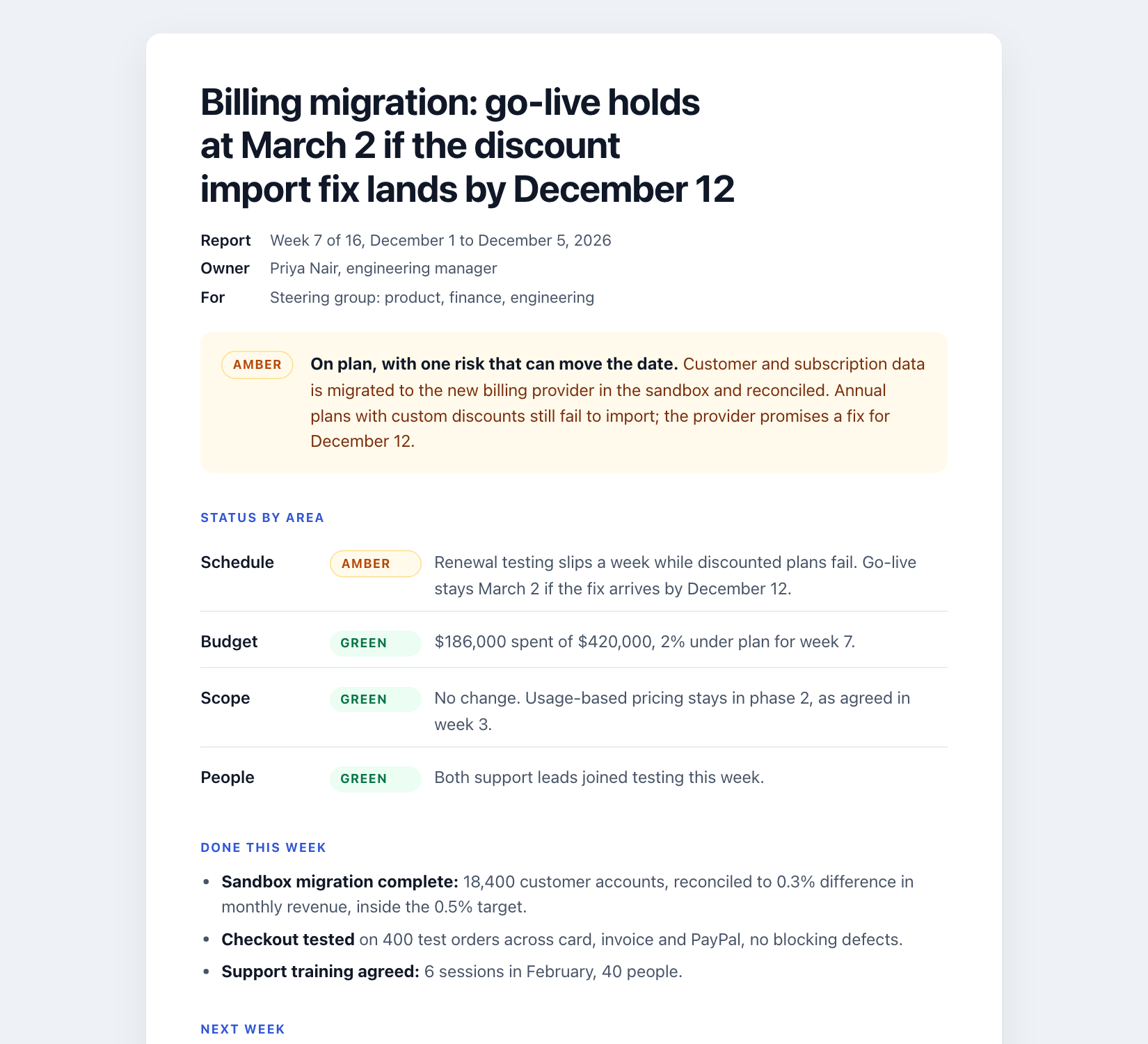
Open the full report, then copy the template below.
The project status report template
[HEADLINE] The one thing the reader must know this week, in one sentence.

Project: [name] · Report: [period, week N of M] · Owner: [name]
For: [who reads it]

OVERALL: [Green / Amber / Red]
[One or two sentences: why this status, and what would change it.]

STATUS BY AREA
- Schedule: [status] | [one line with the date or slip]
- Budget: [status] | [spent of total, against plan]
- Scope: [status] | [changes, or "no change"]
- People: [status] | [gaps, or "no change"]

DONE THIS PERIOD
- [Result, with the number that proves it]

NEXT PERIOD
- [What happens next, with an owner]

RISKS AND ISSUES
- [Issue or risk]: [impact] | [owner] | [date or mitigation]

DECISION NEEDED
- [What you need, from whom, by when, and what happens without it]

MILESTONES
- [Milestone] | [date] | [done / on track / at risk]
It is plain text, so it pastes into Word, Google Docs, Confluence or an email without fixing a layout. It also works as an instruction for an agent: the prompt further down uses it. The Word version has the areas, risks and milestones as tables, and opens in Google Docs too:
How to fill in each part
- Headline. Write the outcome, not the topic: "Go-live holds at March 2 if the discount import fix lands by December 12", not "Week 7 update". A sponsor who reads one line should know whether to read on.
- Overall status. Agree what the colours mean before the first report. A common rule: green means on plan, amber means a risk that can move a date or the budget and has a fix, red means the plan no longer holds without a decision. Always give the reason next to the colour.
- Status by area. One line each, with a number or a date. "Budget: green" says nothing; "$186,000 spent of $420,000, 2% under plan" lets the reader check.
- Done and next. Results, not activity. "Checkout tested on 400 test orders" is a result; "worked on testing" is not.
- Risks and issues. An issue is already happening, a risk might. Give each one an owner and a date, or it reappears unchanged next week.
- Decision needed. The section sponsors act on. Name the decision, the cost, the deadline and what happens if nobody decides.
If a week has nothing new, say so in the headline and keep the report short. A status report that changes only when something goes wrong teaches people to skip it.
Weekly, monthly or executive
The parts stay; their depth changes with the reader.
- Weekly, for the team and the project sponsor: all sections, with done and next in detail. Five minutes to read.
- Monthly, for a steering group: overall status, areas, milestones and decisions. Done and next shrink to the three results that moved the plan.
- Executive, for leadership across several projects: one headline and status per project, then only the decisions and red items. The rest links to the full reports.
When the project ends, the last report becomes a closing summary for leadership, like the project executive summary example.
Fill it in from your tracker
The facts for a status report already sit in Jira, Linear, Asana or a spreadsheet, and in the week's meeting notes. The work is choosing what matters and writing it for someone outside the project. Export the period's tasks, add last week's report and your own notes, and paste them into Birta's chat, or into the agent you already use with Birta connected:
Write a project status report for [project] covering [period] and publish it on Birta as a single page. Readers: [who], who decide [what] and have five minutes. Format: a headline with the one thing they must know; overall status as Green, Amber or Red with the reason in one or two sentences; status by area for schedule, budget, scope and people, one line each with a number or date; done this period as results; next period with owners; risks and issues with impact, owner and date; the decision needed with cost and deadline; milestones with date and status. Status rule: green is on plan; amber is a risk with a fix that can move a date or the budget; red is a plan that no longer holds without a decision. Use only the facts below. Compare with last week's report and say what changed. If a number, owner or date is missing, write "missing" instead of guessing and list the gaps at the end of your answer. Tracker export, last report and notes: [paste here]
Read the overall status yourself before sending. An agent picks the colour from the rule and the facts it was given; you know what the sponsor already expects.
Send the report as a link
A report sent as a link is a web page, not an attachment:
- It opens on a phone, which is where sponsors read a weekly update.
- Questions land on the line they are about. A sponsor who doubts the budget line leaves a remark on it, without an account, instead of starting a thread.
- Next week goes to the same address. The steering group keeps one link; earlier weeks stay in the project's version history.
Each area, risk and milestone on the example page has its own anchor, so a message can
point at one line: project-status-report-example.birta.link/#decision-1.
Turn a tracker export into a report
Paste the export into Birta's chat. The agent writes the status report and gives you a link the sponsors can comment on.